Introduction
Mixer and Filler Process Overview
This document explains how syrup batching and bottling operations are represented in the historian. It provides context for each tag, the meaning of the data, how it behaves over time, and how the Mixer States can be interpreted to understand the process.
Process Summary
There are two primary departments represented in this data model: Mixing and Packaging.
Each department receives its own work orders.
Mixing work orders define the syrup batches to produce. Each order specifies the recipe and target volume. Mixers execute the batch, then transfer the finished syrup to a storage tank where it is held until needed. The syrup may later be used by Packaging or by other factory processes not covered in this document.
Packaging work orders define the products to bottle. The fillers consume the syrup concentrate from storage and blend it with water at the filler according to the recipe. Each filler runs its own work order independently, meaning different products can be bottled simultaneously on separate fillers.
Work orders, customer details, product descriptions, SKUs, and quantities are managed in the homegrown MES system, which is backed by a SQL database.
Syrup Preparation
Mixer tags and what they represent: Each mixer has a total capacity of 55 hectoliters(hl) per vessel. This capacity is relevant when evaluating fill duration, batch sizing, heating efficiency, transfer timing, and overall throughput.
|
Tag |
Meaning |
Data Pattern |
Unit of Measure (UOM) |
Interpretation |
|
MX001.Product |
Product/recipe assigned to batch |
Constant during all non-idle states |
Unitless (integer) |
Defines batch identity; changes only when mixer returns to Idle |
|
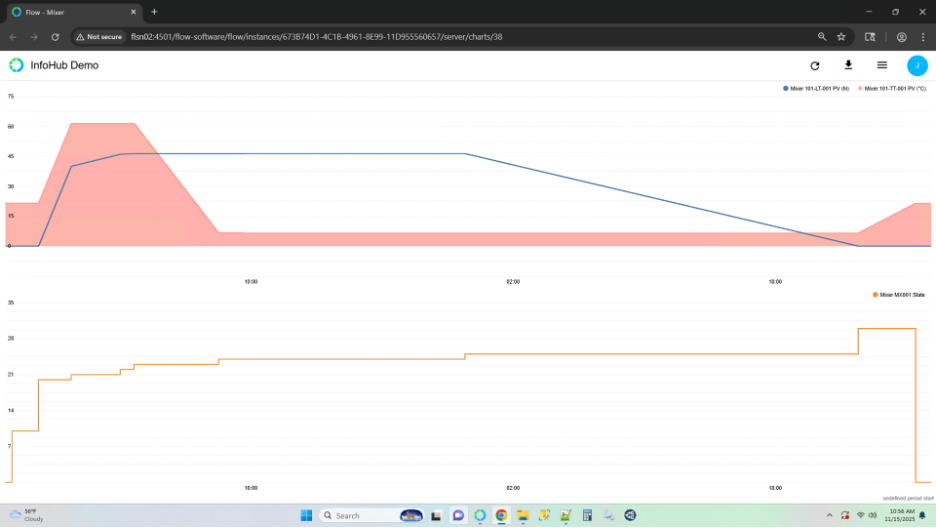
MX001.State |
Operating phase of mixer |
State transitions |
Unitless (integer) |
Indicates the step in the batch sequence |
|
101-LT-001.PV |
Mixer level |
Continuous analog |
Hectoliters (hl) |
Ingredient fill, transfer, and residual tracking |
|
101-TT-001.PV |
Mixer temperature |
Continuous analog |
Degrees Celsius (°C) |
Heating, soaking, mixing, and cooling behavior |
Important behaviors:
- A batch run is a multiday process
- Product does not change during a batch; it changes only when the mixer returns to state 0 (Idle)
- Level reveals when material is entering or leaving the vessel
- Temperature reveals when heating and mixing phases are active
- State defines which phase of the batch recipe is executing
Mixer State Definitions
|
State |
Description |
Observable Trend Behavior |
|
0 |
Idle |
Tank empty, heater on to maintain tank base temp |
|
10 |
Prebatch Setup |
Tank empty, heater on to maintain tank base temp |
|
20 |
Ingredient Addition: Primary |
Level rising rapidly; heater on and temperature climbing to production setpoint |
|
21 |
Ingredient Addition: Secondary |
Level rising steadily; temperature stabilizing after ramp |
|
22 |
Ingredient Addition: Tertiary |
Level rising slowly; temperature tightly controlled |
|
23 |
Main Blend |
Level steady; heater off and temperature falling; agitator running |
|
24 |
Awaiting Transfer |
Level steady; heater off temperature stabilized to room value; downstream tank may not be ready |
|
25 |
Transfer to Storage |
Level falling until near zero; temperature stable |
|
30 |
Clean in place (CIP) / Sanitation |
Heater off, temperature cycling based on cleaning process |
Batch interpretation rules:
- Batch begins when state enters 10 (Prebatch Setup)
- Batch ends when state leaves 30 (CIP / Sanitation)
- Product changes only after returning to 0
Here is a screenshot of...:
Packaging
Filler tags and what they represent
Each filler has a maximum throughput capability of 950 bottles per minute. This value is useful when comparing actual runtime output against theoretical capacity, determining efficiency loss, and benchmarking performance across products and crews.
|
Tag |
Meaning |
Data Pattern |
Unit of Measure |
Interpretation |
|
FL001.Product |
Product running on filler |
Constant during work order |
Unitless |
Links a filler run to upstream batch identity |
|
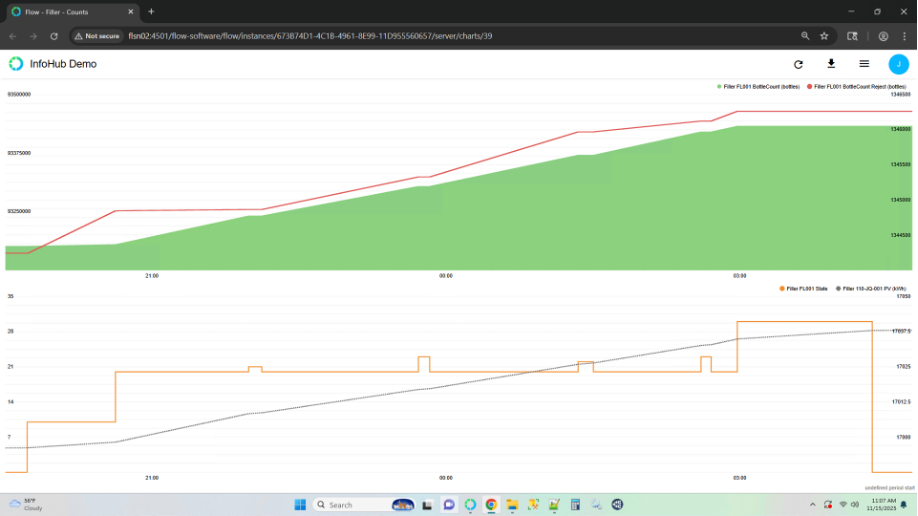
FL001.State |
Operating mode of filler |
State transitions |
Unitless (integer) |
Determines whether filler is producing, configuring, waiting, faulted, or being cleaned |
|
FL001.BottleCount |
Good units produced |
Increasing totalizer |
bottles |
Production output |
|
FL001.BottleCount.Reject |
Rejected units |
Increasing totalizer |
bottles |
Quality losses |
|
110-FQ-001.PV |
Syrup flow |
Increasing totalizer |
Hectoliters (hl) |
Syrup consumption |
|
111-FQ-002.PV |
Water flow |
Increasing totalizer |
Hectoliters (hl) |
Dilution/water consumption |
|
110-JQ-001.PV |
Energy usage |
Increasing totalizer |
Kilowatt-hour (kWh) |
Power consumption |
Flow meter roles:
- FQ-001 and FQ-003: syrup supply
- FQ-002 and FQ-004: water supply
- JQ-001 and JQ-003: energy
Filler State Definitions
|
State |
Description |
|
0 |
Idle: no production |
|
10 |
Setup: changeover and configuration |
|
20 |
Runtime: active bottle filling |
|
21–29 |
Faults: equipment stopped due to failure condition |
|
30 |
Clean in place (CIP): cleaning in place |
Here is a screenshot of...:
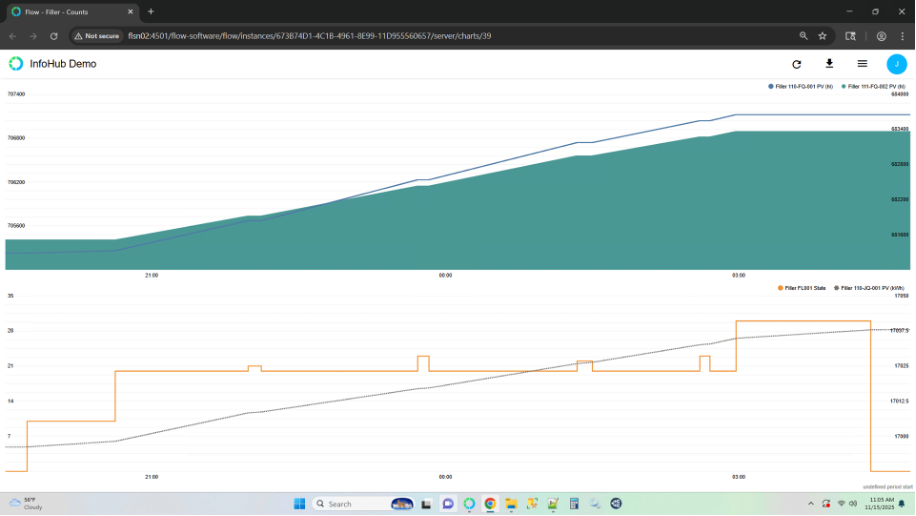
A second screenshot representing...: